Why DMS Implementations Fail in India
The distribution management software (DMS) market in India is booming. More distributors than ever are adopting technology to manage orders, billing, routes, and inventory. But adoption does not equal success. Industry data suggests that 35-40% of DMS implementations in Indian distribution operations either fail outright or deliver significantly less value than expected (source: NASSCOM, "Enterprise Software Adoption in Indian FMCG," 2024).
The failures are almost never about the software itself. Modern platforms like SpireStock, and competitors across the market, are capable and robust. The failures are about how the software is implemented, the decisions made (or not made) in the first 90 days that determine whether the system becomes the backbone of your operation or an expensive shelf-ware.
Here are the 10 most common mistakes, drawn from real implementations across dairy, FMCG, and beverage distribution companies in Mumbai, Delhi, Bangalore, Pune, and across India. Each comes with a specific fix and a timeline for getting it right.
Mistake 1: No Pilot Period
The most dangerous mistake is rolling out to your entire network on day one. Full-network launches are tempting, "let's just get it done", but they create hundreds of simultaneous problems that overwhelm your support capacity.
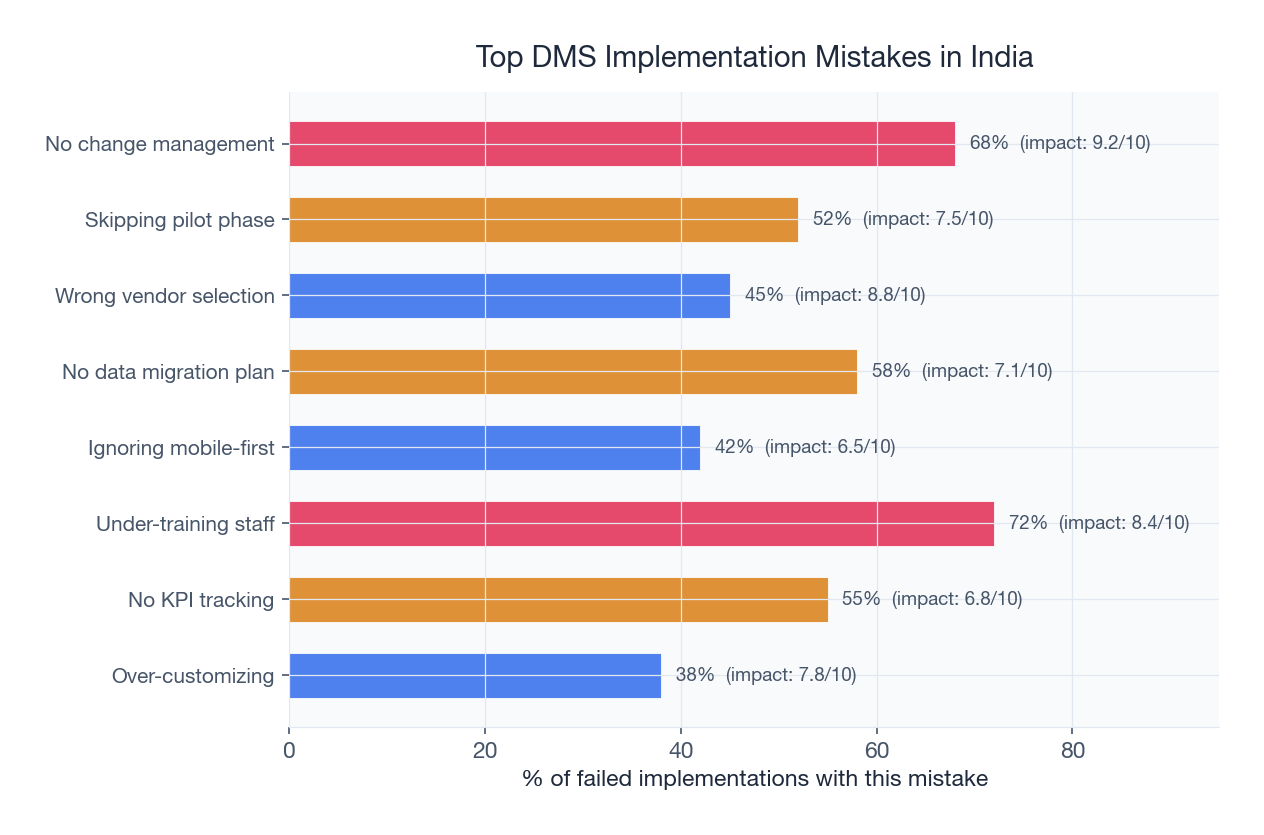
What goes wrong: Every distributor has a slightly different workflow, internet connectivity, and tech comfort level. When 200 distributors hit problems simultaneously, your support team cannot respond fast enough. Distributors lose patience, revert to manual processes, and the implementation stalls.
The fix: Start with a pilot group of 15-25 distributors (10-15% of your network) for 3-4 weeks. Choose distributors across different profiles: urban and rural, large and small, tech-savvy and traditional. Use the pilot to identify workflow gaps, training needs, and technical issues before they multiply across the full network.
Timeline: 3-4 weeks for pilot, 1 week for evaluation and fixes, then phased rollout in batches of 30-50 distributors per week.
Mistake 2: Skipping Data Cleanup
Your DMS is only as good as the data in it. Most Indian distribution operations have years of accumulated data inconsistencies, duplicate distributor entries, wrong addresses, outdated pricing, incorrect outstanding balances, and mismatched product catalogs.
What goes wrong: Dirty data imported into a new system creates wrong invoices, incorrect deliveries, and disputed balances from day one. Distributors lose trust in the system immediately, "the software is showing wrong numbers", and adoption collapses.
The fix: Dedicate 2-3 weeks to data cleanup before go-live. Verify every distributor's details, reconcile all outstanding balances, standardize product names and SKU codes, and validate pricing across all territories. This is tedious but non-negotiable.
Timeline: Start data cleanup 4-5 weeks before planned go-live. Assign a dedicated team (not the IT team, the operations team who knows the data).
Mistake 3: Not Training the Field Team
Companies invest in training head office staff and managers but neglect the people who actually use the system 8 hours a day: delivery drivers, salesmen, and warehouse staff. These are the users who determine whether the system works in practice.
What goes wrong: Untrained field staff create workarounds, calling the office to place orders instead of using the app, skipping OTP verification at delivery, not scanning crates. These workarounds mean the system has no reliable data, which means the dashboards and reports are meaningless.
The fix: Design a separate, simplified training program for field staff. Use video tutorials in local languages (Hindi, Marathi, Tamil, Kannada, whichever applies). Keep sessions under 45 minutes. Focus on the 3-4 tasks they will do daily, not the full system. Pair each field staff member with a "buddy" for the first week. The mobile app interface should be simple enough that field staff can learn it in one session.
Timeline: 2-3 days of field training per batch, completed 1 week before that batch goes live.
Mistake 4: Ignoring Internet Reliability
Indian distribution routes frequently pass through areas with poor or no internet connectivity. A DMS that requires constant internet access will fail in these environments, and your field team will blame the software, not the network.
What goes wrong: Delivery staff cannot complete transactions in areas with no connectivity. Orders pile up unsent. The system shows stale data. The field team reverts to paper as a "backup" and never comes back to the app.
The fix: Ensure your DMS has robust offline capability. The app should store all necessary data locally (distributor details, product catalog, pricing, pending orders) and function fully offline for order taking, delivery confirmation, and payment recording. When connectivity returns, data should sync automatically with conflict resolution. Test this extensively during the pilot, specifically test in your worst-connectivity areas.
Timeline: Test offline capability during pilot (weeks 1-3). If gaps exist, work with the vendor to fix them before full rollout.
Mistake 5: Over-Customizing from Day One
Every distribution operation has unique workflows, and the temptation to customize the software to match every existing process is strong. But excessive customization before you understand the system's standard capabilities leads to bloated, fragile implementations.
What goes wrong: Custom workflows are expensive to build, hard to maintain, and break during software updates. They also prevent you from benefiting from the vendor's standard best practices, which are refined from hundreds of other implementations.
The fix: Adopt the standard system for 60-90 days before requesting any customization. During this period, you will discover that many of your "unique" workflows are actually common patterns that the standard system handles. For genuinely unique needs, request customization only after you have documented exactly what the standard system cannot do and why your process cannot adapt. Read more in our guide to distributor onboarding best practices.
Timeline: No customization requests for the first 60 days. Evaluate genuine needs at the 90-day mark.
Mistake 6: No Executive Sponsor
DMS implementation is a cross-functional project that touches sales, operations, finance, IT, and field teams. Without a senior executive who owns the project and can resolve cross-departmental conflicts, implementations drift, stall, and eventually die.
What goes wrong: The sales team wants one workflow, finance wants another, and operations has a third preference. Without an executive sponsor to make decisions and enforce adoption, the project gets stuck in endless meetings. Middle managers cannot compel compliance from resistant teams.
The fix: Assign a C-level or director-level executive sponsor before the project begins. This person does not manage the day-to-day implementation, that is the project manager's job. The sponsor's role is to: make decisions when departments disagree, enforce adoption mandates, allocate resources when needed, and communicate the "why" to the entire organization.
Timeline: Sponsor assigned before project kickoff. Weekly 30-minute sponsor updates throughout implementation (12-16 weeks).
Mistake 7: Going All-Modules at Once
Modern DMS platforms offer 8-12 modules: orders, billing, dispatch, routes, crates, schemes, analytics, payments, and more. Implementing all of them simultaneously is overwhelming for users and operations teams alike.
What goes wrong: Users face information overload. Training becomes a marathon. Problems in one module delay all others. The operations team cannot support troubleshooting across 8 modules simultaneously.
The fix: Phase the rollout by module. Start with the highest-impact, lowest-complexity module, typically billing and invoicing (immediate GST compliance benefit, familiar workflow). Add order management in phase 2, route optimization in phase 3, and analytics in phase 4. Each phase should be stable for 3-4 weeks before adding the next. For the recommended phased approach, see our post on digitizing family dairy businesses.
Timeline: 4-week intervals between module launches. Full rollout across all modules: 16-20 weeks.
Mistake 8: Not Measuring Before and After
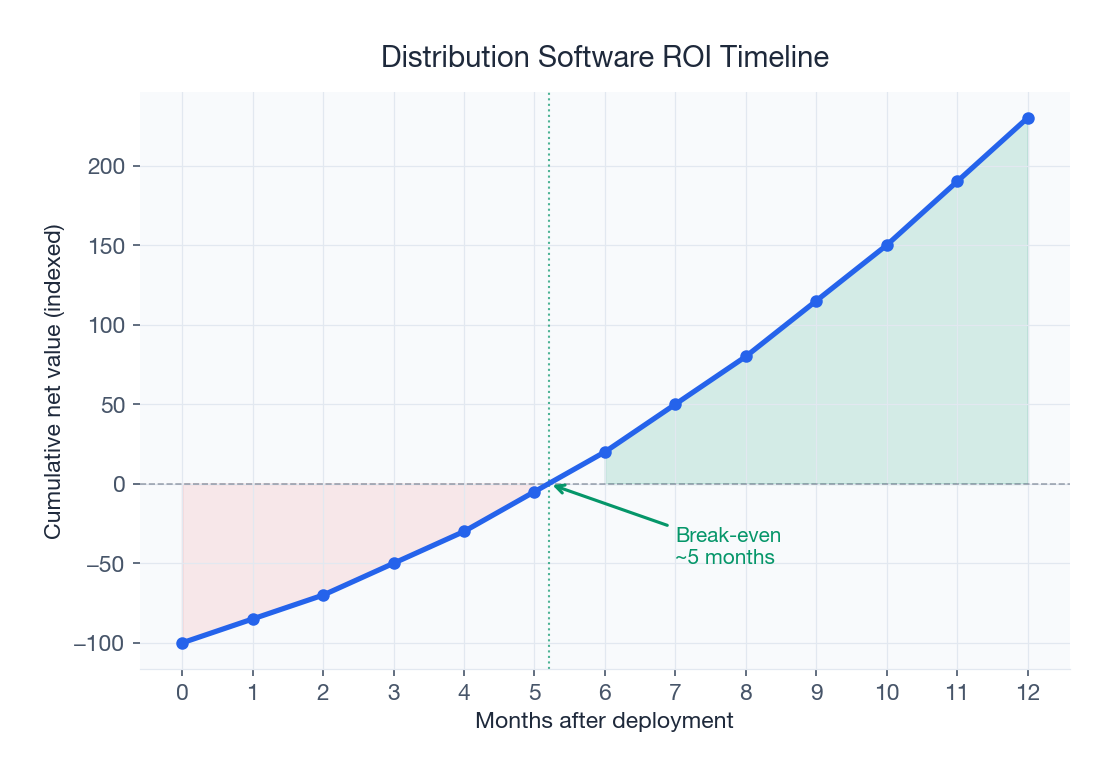
If you do not measure your current performance before implementing the DMS, you cannot prove it is working afterward. This is not just an academic point, it is a practical one. Without measurable improvement, the organization's enthusiasm for the new system fades, and adoption slips.
What goes wrong: Six months post-implementation, the management asks "What has this software actually done for us?" and the project team cannot answer with specific numbers. Budget for renewal comes under threat. Competing priorities push the DMS down the agenda.
The fix: Document baseline metrics for 4-8 weeks before go-live. Measure:
| Metric | What to Measure | How to Measure | Target Improvement |
|---|---|---|---|
| Order processing time | Hours from order receipt to dispatch-ready | Time-stamp samples for 50+ orders | 60-80% reduction |
| Crate loss rate | Crates lost as % of total inventory | Physical count vs. register | 80% reduction |
| Fuel cost per delivery | Daily fuel spend / number of deliveries | Fuel bills + delivery count | 20-30% reduction |
| DSO (Days Sales Outstanding) | Average days to collect payment | Accounting records | 5-10 day improvement |
| Billing error rate | Invoices with errors / total invoices | Random audit of 100 invoices | 90%+ reduction |
| Scheme accuracy | Correct scheme application % | Audit scheme disbursements | Near 100% |
Timeline: Baseline measurement starts 6-8 weeks before go-live. Post-implementation measurement at 30, 60, 90, and 180 days. For a complete ROI framework, use our ROI calculation guide.
Mistake 9: Neglecting Mobile UX
In Indian distribution, 80-90% of system interactions happen on mobile devices, Android smartphones in the Rs 8,000-15,000 range. If the mobile experience is clunky, slow, or confusing, field adoption will collapse regardless of how powerful the backend is.
What goes wrong: The admin dashboard looks great on a laptop, but the mobile app is an afterthought, slow to load, tiny buttons, complex navigation, and no offline support. Delivery drivers with calloused hands cannot tap tiny checkboxes. Salesmen in the field give up after the app crashes for the third time.
The fix: Evaluate the mobile app as a separate product during vendor selection. Test it on mid-range Android devices (not the vendor's demo iPhone). Check: app size (under 50 MB), load time (under 3 seconds), offline capability, button sizes (thumb-friendly), and workflow steps (fewer than 5 taps for any common action). If the vendor's mobile app is weak, consider it a deal-breaker, no amount of backend power compensates for poor field UX.
Timeline: Mobile UX evaluation during vendor selection (before purchase). On-device testing during pilot with actual field staff.
Mistake 10: No Parallel-Run Period
Cutting over from manual/legacy systems to the new DMS overnight, "hard cutover", is the highest-risk approach to go-live. If anything goes wrong (and something always does), you have no fallback.
What goes wrong: The new system has a bug in invoice calculation. Or the data migration missed some distributor balances. Or the route optimizer sends vehicles to wrong locations. Without the old system running in parallel, you cannot serve your customers while fixing these issues. One bad day of missed deliveries in dairy distribution can lose distributors permanently.
The fix: Run both systems simultaneously for 2-4 weeks after go-live. Yes, this means double the work temporarily. But it means you can verify that the new system matches the old one (or improves on it) before decommissioning the legacy process. Compare invoices, cross-check balances, and validate delivery routes daily during the parallel run. Only switch off the old system when you have 2 consecutive weeks of matching data.
Timeline: 2-4 week parallel run per phase (module). Decommission legacy process only after data validation confirms accuracy.
Implementation Success Checklist
Here is a consolidated checklist that addresses all 10 mistakes:
- Executive sponsor assigned and engaged (weekly updates)
- Baseline metrics documented for 4-8 weeks pre-go-live
- Data cleanup completed and verified (2-3 weeks before go-live)
- Pilot group selected (15-25 distributors, mixed profiles)
- Pilot run completed (3-4 weeks) with issues documented and resolved
- Field team training completed in local languages (2-3 days per batch)
- Offline capability tested in worst-connectivity areas
- Module phasing plan defined (billing first, then orders, routes, analytics)
- No customization for first 60 days (standard adoption)
- Parallel run planned for 2-4 weeks post-go-live per phase
- 30/60/90/180-day measurement milestones scheduled
- Mobile app tested on mid-range Android devices by actual field staff
The Implementation Timeline That Works
| Week | Activity | Mistakes Prevented |
|---|---|---|
| -8 to -6 | Baseline measurement begins | #8 (No measurement) |
| -5 to -3 | Data cleanup and verification | #2 (Dirty data) |
| -2 to -1 | Field team training (pilot batch) | #3 (No training) |
| 1 to 4 | Pilot with 15-25 distributors (billing only) | #1 (No pilot), #7 (All modules) |
| 5 | Pilot evaluation, fix issues | #5 (Over-customizing) |
| 6 to 8 | Phase 1 full rollout (billing) + parallel run | #10 (No parallel run) |
| 9 to 12 | Phase 2: Order management rollout | #7 (All modules at once) |
| 13 to 16 | Phase 3: Route optimization rollout | #4 (Internet issues tested) |
| 17 to 20 | Phase 4: Analytics + scheme management | #9 (Mobile UX validated) |
| 24 | 180-day review and ROI assessment | #8 (Measurement validated) |
Conclusion: Implementation Is the Product
The best distribution software in the world will fail if implemented poorly. Conversely, even a mid-tier platform can deliver outstanding results with disciplined implementation. The 10 mistakes outlined above are all preventable, they require planning, patience, and discipline rather than technical expertise or additional budget.
If you are about to begin a DMS implementation, use this article as your risk checklist. If you have already started and are struggling, it is not too late to course-correct, go back to the pilot approach, clean up your data, invest in field training, and measure everything. For a broader view of digitizing your distribution operation, see our guides on manual vs. digital distribution and setting up a distribution network in India.
Ready to implement distribution software the right way? Contact our team for a structured implementation plan tailored to your operation.
Sources & References
Frequently Asked Questions
Skipping the pilot period. Rolling out to your entire distributor network on day one creates hundreds of simultaneous problems that overwhelm support capacity. Start with 15-25 distributors for 3-4 weeks, fix issues, then expand in batches of 30-50 per week.
A well-planned DMS implementation takes 20-24 weeks from baseline measurement to full rollout. This includes 6-8 weeks pre-go-live (baseline measurement, data cleanup, pilot training), 4-week pilot, and 12-16 weeks of phased module rollout. Rushing below 16 weeks significantly increases failure risk.
Not in the first 60-90 days. Adopt the standard system first and let your team learn the platform's native capabilities. Many workflows you consider 'unique' are standard patterns the system already handles. Request customization only after documenting what the standard system genuinely cannot do.
Choose a platform with robust offline capability, the mobile app must function fully offline for order taking, delivery, and payment recording. Test offline mode specifically in your worst-connectivity areas during the pilot phase. Data should sync automatically with conflict resolution when connectivity returns.
Track six key metrics for 4-8 weeks before go-live: order processing time, crate loss rate, fuel cost per delivery, Days Sales Outstanding (DSO), billing error rate, and scheme application accuracy. These baselines are essential for proving ROI at 30, 60, 90, and 180-day review points.
A parallel run (2-4 weeks of running old and new systems simultaneously) protects against data migration errors, calculation bugs, and workflow gaps. In dairy distribution, one day of missed deliveries can permanently lose distributor relationships. The parallel run ensures you can fall back to the old system if critical issues emerge.
Related SpireStock Features
Real-time GPS tracking of vehicles and drivers with route optimization for faster deliveries.
Mobile app for distributors, retailers, and delivery teams.
End-to-end order lifecycle from placement to delivery with multi-level approval workflows.
Related Industries
Streamline FMCG distribution with order management, beat planning, retailer tracking, and GST billing. Built for Indian FMCG supply chains.
End-to-end dairy distribution software for milk, curd, paneer, and ghee brands. Manage orders, crates, cold chain, and GST billing in one platform.
Related Solutions
Manage your entire distributor network digitally. Onboarding, credit limits, outstanding tracking, and performance analytics. Start free trial.
Boost field sales team productivity with beat planning, GPS attendance, order capture, and performance analytics. Built for Indian FMCG teams.
Related Entities
Ready to Streamline Your Distribution?
Start your free 14-day trial and see how SpireStock can transform your dairy, FMCG or consumer-goods distribution operation, from order capture to crate recovery.

SpireStock Team
Distribution Technology Experts
SpireStock Team writes for SpireStock on distribution management, supply-chain optimisation and field operations for Indian dairy and FMCG brands.